Blog
Written By:
Cyril Kumar Selvaraj
Executive Summary
Every minute of data platform downtime can cost millions — impacting productivity, revenue, and customer trust. Our Databricks Disaster Recovery (DR) framework ensures that critical analytics workloads remain operational even during regional outages. By combining automation, secure storage, and optimized recovery strategies, organizations can reduce downtime, control costs, and maintain business continuity with confidence.
A Disaster Recovery (DR) strategy is essential to mitigate these risks. We’ve built a resilient Databricks DR framework that ensures business operations continue smoothly even in the face of unexpected disruptions.
Why Disaster Recovery Matters
A resilient DR strategy for Databricks safeguards mission-critical data, sustains uninterrupted analytics operations, and minimizes financial risk. It enables rapid recovery and cost-optimized failovers to keep business decisions flowing without disruption.
- Maintain business continuity: Keep operations running smoothly without interruptions.
- Protect data and assets: Always safeguard mission-critical information.
- Enable rapid recovery: Restore systems quickly and reliably in a DR environment.
- Optimize costs: Use storage and resources efficiently to control expenses.
Together, these benefits provide business leaders with confidence, knowing their data platform can bounce back and maintain operations even during unexpected disruptions.
How Our DR Framework Works
Our solution delivers automated backups for all critical Databricks components, ensuring business continuity and rapid recovery:
Protect Data Tables: Capture consistent snapshots of your business data for reliable restoration.
Secure Views and Functions: Preserve essential business logic for seamless rebuilds.
Safeguard Security Secrets: Back up tokens and credentials to guarantee uninterrupted access.
In the event of a disruption, these backups are instantly leveraged to reconstruct a fully operational Databricks environment at the Disaster Recovery (DR) site, enabling teams to restore operations quickly and minimize downtime.
Architecture Overview
The following diagram provides a high-level view of the Databricks Disaster Recovery framework and illustrates how its components work together to ensure business continuity.
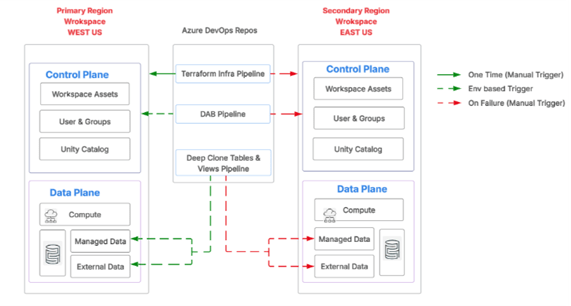
This architecture spans a Primary Region in West US and a Secondary Region in East US. Each region contains Control Plane and Data Plane components.
Control Plane (Managed by Databricks): Manages workspace assets, user and group configurations and the Unity Catalog.
Data Plane: Handles computing, managed data and external data.
Azure DevOps Repos (Automated): Orchestrates pipelines including the Terraform Infra Pipeline, DAB Pipeline and Deep Clone Tables and Views Pipeline. Execution is controlled through triggers that are manual, environment-based, or failure-driven, typically scheduled to run daily or on-demand based on business criticality.
| Asset Type | Description | Value |
| Data Tables | Captures consistent, incremental snapshots | Guarantees data accuracy |
| Views & Functions | Stores reusable business logic securely | Reduces rework time |
| Security Secrets | Backs up tokens and credentials | Enables smooth service reactivation |
Azure DevOps Pipelines
| Pipeline | Description | Outcome |
| Terraform Infra Pipeline | Automates infrastructure deployment and networking setup | Consistent, repeatable environments |
| DAB Pipeline | Deploys Databricks Asset Bundles — notebooks, jobs, clusters | Standardized workspace setup |
| Deep Clone Pipeline | Uses Delta clone for tables & views replication | Near real-time data availability in DR site |
Balancing Reliability and Cost
One of the biggest challenges in Disaster Recovery is finding the right balance between cost and reliability. Our framework offers flexibility through two storage options:
- Hot storage: Provides instant access when speed is critical
- Archive storage: Offers cost savings when longer recovery times are acceptable
This approach allows organizations to select the option that best aligns with their business priorities and budget.
The Business Impact
With our Databricks DR framework, organizations achieve measurable outcomes:
- Reduced downtime: Recover environments up to 80% faster.
- Improved efficiency: Automated deployment minimizes manual errors and recovery steps.
- Cost optimization: Automation and tiered storage reduce total recovery costs by 30–40%.
- Sustained continuity: Analytics teams remain productive even during outages.
Use Case Example
A financial analytics team experienced a regional outage impacting their Databricks workspace. Using our DR automation framework, they restored a fully functional environment in 3-5 hours with no data loss — ensuring uninterrupted reporting for executive decision-making.
Conclusion and Next Steps
Databricks DR is not just about recovery — it’s about readiness. Our automated, cost-efficient solution empowers organizations to protect their most valuable asset. Assess your Databricks DR readiness today contact our team for a quick resilience workshop.
Related Resources:

Modernize Legacy Data Workloads Faster with DBShift™ + Snowflake — Webinar
Watch how DBShift™ automates legacy-to-Snowflake migration with high accuracy—live demo, architecture, and proven outcomes. Ideal next step after this article.

Unified Data with Snowflake & Systech
See how Systech leverages Snowflake’s power to deliver seamless, scalable data solutions.

Snowflake Partnership: Built for the Future
Explore how our Snowflake partnership empowers GenAI-driven transformation journeys.