Snowpark Container Services brings the flexibility of containerized applications directly into Snowflake. As organizations increasingly use SPCS to build Native Apps, AI solutions and custom services, compute management becomes an essential part of sound application architecture.
Snowflake Native Apps have evolved beyond SQL-driven applications and dashboards. With Snowpark Container Services (SPCS), developers can run containerized APIs, application services, AI workloads and custom frameworks alongside enterprise data within Snowflake.
This flexibility creates new possibilities — but it also introduces a different compute model.
For organizations building applications on SPCS, the objective should not simply be to provision enough infrastructure. It should be to ensure that compute capacity closely follows actual application demand.
That makes compute optimization an architectural consideration rather than an afterthought.
For builders of Snowflake Native Apps, this means cost efficiency is not just an operational concern. It is a design choice that should shape how services are deployed, scaled, suspended and observed across environments.
Understand the Compute Lifecycle
A containerized Native App generally operates across three layers: the Snowflake Native App, the SPCS service that runs the application containers, and the compute pool that provides the infrastructure for those containers.

The service runs the application’s containers, while the compute pool provides the underlying infrastructure on which those containers execute. Both layers influence consumption: services determine what runs, and compute pools determine how much capacity remains available to support them.
An important distinction is that an application receiving no user traffic does not necessarily mean that its underlying compute has already been suspended.
For example, a development application may be used during business hours but remain provisioned overnight or through the weekend unless appropriate suspension policies are configured.
The goal is therefore simple:
Make compute available when the application needs it and release it when it does not.
Optimize at Both the Service and Compute-Pool Level
Efficient SPCS architecture requires considering both layers.
At the service level, applications can be designed to reduce or suspend running instances when activity drops.
At the compute-pool level, capabilities such as auto-suspend and auto-resume can help prevent infrastructure from remaining provisioned after services become idle.
The lifecycle should ideally look like this:
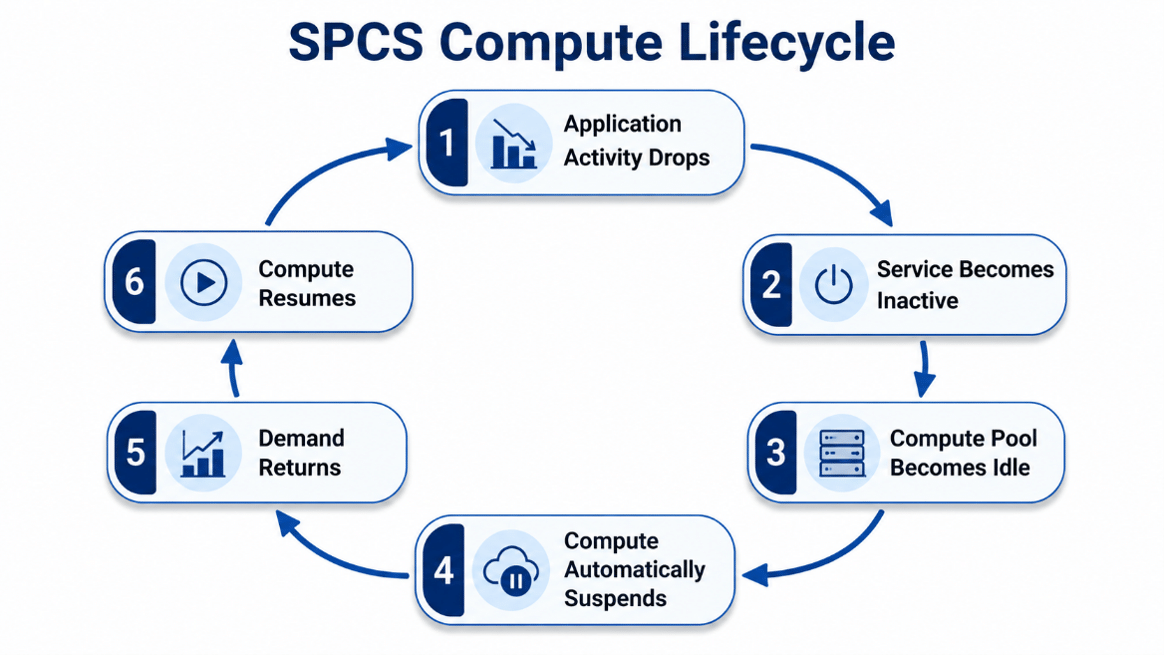
This becomes particularly valuable for development, testing, demonstration and intermittently used applications.
Production workloads with continuous availability requirements may follow a different model, maintaining baseline capacity while scaling according to demand.
Right-Size for the Workload
Compute optimization is not only about suspending idle resources; it is also about choosing the right baseline capacity for the workload.
Sizing matters just as much as suspension because an oversized compute pool can create unnecessary baseline consumption even when suspension policies are in place.
Different applications have very different infrastructure requirements. A lightweight API may require minimal CPU and memory, while document processing, machine-learning inference or agentic AI workloads may require considerably more resources.
The compute pool should therefore be sized based on factors such as:
- Application concurrency
- CPU and memory requirements
- Workload duration
- Response-time expectations
- AI or ML processing requirements
- Expected peak versus average utilization
Selecting infrastructure based only on anticipated peak demand can lead to unnecessary baseline consumption.
A better approach is to establish an appropriate starting capacity and scale when workload demand justifies it.
Treat Development and Production Differently
Because usage patterns vary by environment, one compute configuration rarely fits every scenario. A practical operating approach might be:
Development and sandbox
Use minimal infrastructure and aggressive auto-suspension.
Testing and demonstrations
Resume on demand and suspend shortly after activity ends.
Intermittent production
Maintain responsive auto-resume behaviour while allowing unused resources to suspend.
Always-on production
Maintain appropriate baseline capacity and use scaling to handle changing demand.
This allows infrastructure policy to follow the actual business requirement rather than applying one configuration everywhere.
Make Consumption Visible
The final element is observability: teams need visibility into how SPCS compute is consumed over time. Snowflake provides usage information that allows teams to understand SPCS compute consumption over time.
Are development services running outside expected hours? · Which applications consume the most container compute? · Are compute pools appropriately sized? · Has consumption changed following a new application release? · Does infrastructure usage reflect actual application activity?
These insights allow architecture, engineering and FinOps teams to move beyond tracking total credits and toward understanding whether infrastructure usage reflects application value.
The more valuable question becomes:
Is the compute being consumed aligned with the value and activity generated by the application?
Cost Efficiency Starts with Architecture
Snowpark Container Services significantly expands what organizations can build within Snowflake, from custom enterprise applications to sophisticated AI and agentic AI solutions.
As this adoption grows, compute lifecycle management should become part of the application’s design from day one.
The guiding principles are straightforward:
- Right-size the infrastructure.
- Scale according to demand.
- Suspend resources when they are not required.
- Treat environments differently.
- Continuously observe consumption.
SPCS provides the flexibility to run modern containerized workloads inside Snowflake. Using that flexibility efficiently is ultimately an application architecture decision.
The objective is not simply to minimize compute.
It is to ensure that the right compute is available at the right time, for the right workload — and for only as long as it is needed.